bengarves.com/work/relevant-skills-module
Relevant Skills Module
[SEO-92] Topics Page - Adapt "Relevant Skills" Module
From Ben Garves’s work at Udemy. Re-created from the original document, with people’s names, internal links and non-public numbers removed or generalized. Sections by others are labeled.
StorySEO-92
- Company
- Udemy
- Created
- Resolved
- Status
- Done
- Priority
- P1 - High
- Story points
- 3
- Project
- SEO Squad
- Sprints
- SEO Sprint 5, SEO Sprint 6
- Requirement source
- Engineering
Adapts the homepage’s “Skills to transform your career and life” module for the v2 Topic page template, giving learners a tabbed carousel of top courses so they can wayfind to popular items without needing to search, sort or filter.
- Topic pages
- Content modules
- Design specs
- Component reuse
User story
As a Topic page user, I’d like to see a subset of top courses (and broken down by relevant filters) so that I have an opportunity to wayfind to popular items without needing to search/sort/filter.
Context
The homepage has a module titled “Skills to transform your career and life” (the “Professional Skills” unit from the homepage v2 project) that we’d like to adapt for the Topic pages.
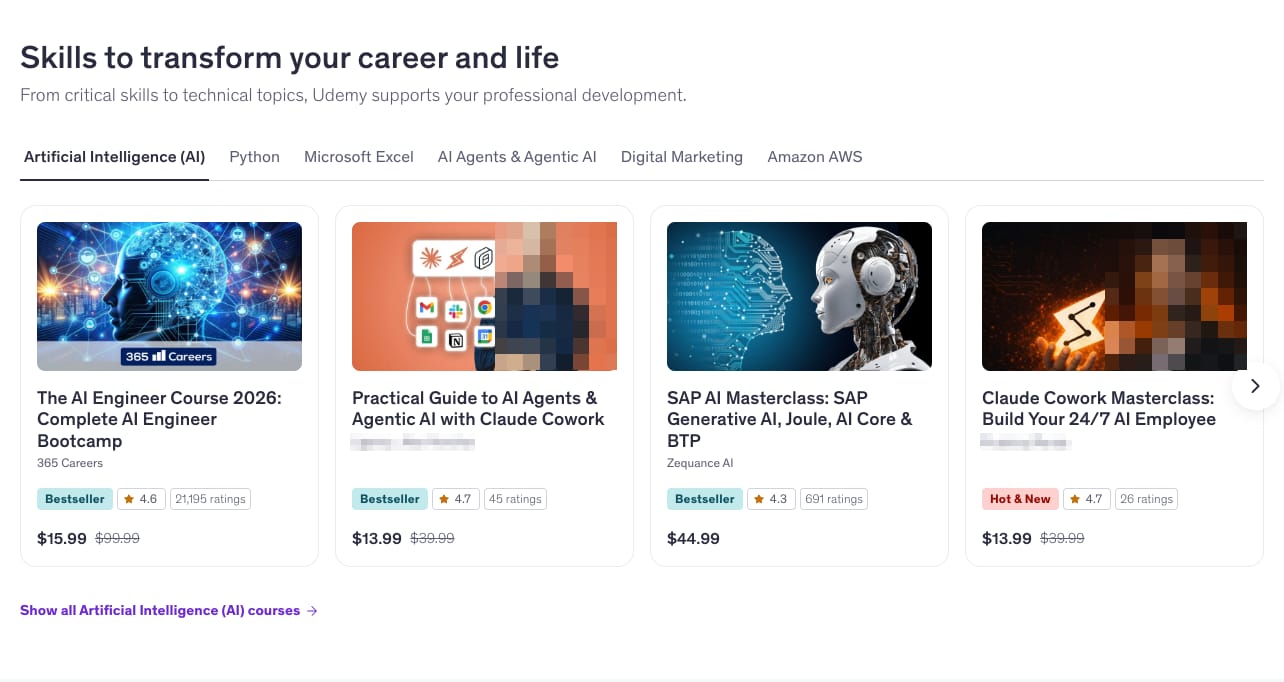 (full-size image)
Acceptance criteria
- The module is brought into the shared modules repo
- The module is added to the new Topic page template
- Card designs should use the product cards set up in a related ticket
Design spec update (June 2026)
Added to the ticket by the design team.
Spec update from design (June 2026), with the comp below for reference.
Note
Some styles may change as we finalize but overall functionality & data will remain the same.
![Design comp for the Topic page version of the module: the heading “AI tools that work as hard as you do” and a subtitle, a row of tabs (ChatGPT, Google Gemini, Claude, Copilot, AI Agents), four placeholder course cards with Bestseller badges, ratings and prices, carousel pagination dots, and an “All [Topic] courses” link.](/media/work/relevant-skills-module/p1-3.jpg) (full-size image)
(full-size image)Desktop: XXL to XXS breakpoints (1340px+ to 701px)
Part of the design team’s update.
- Module spacing
- Horizontal padding for module – maintain site-wide page margins (24px minimum)
- Vertical padding for module – 48px (Space-X-L)
- Horizontal gap between cards – 16px (Space-S)
- Title block
- Title – Udemy Sans, Heading, 32px (HeadingSans/XXL), applied/text/default (#2A2B3F)
- Subtitle – Udemy Sans, Regular, 18px (Text/Large), applied/text/default (#2A2B3F), max-width 800px; break to 2nd line as needed
- Vertical gap between Title + Subtitle – 8px (Space-X-S)
- Vertical gap between Title Block + Tab Group – 32px (Space-L)
- Tab group – XLarge, per the design system documentation
- Vertical gap between Tab Group + Carousel – 16px (Space-M-S)
- 4-up carousel, per the design system documentation
- Max of 12 course cards per topic
- Please use the newer pagination style below the course carousel (documented in the design system)
- Vertical gap between Carousel + Pagination – 16px (Space-M-S)
- Vertical gap between Pagination + Button – 16px (Space-M-S)
- Button style – Ghost, size Medium (40px)
- Copy – Udemy Sans, Heading, 14px (ButtonText/Small), ghost-text OR applied/text/link (#6D28D2)
- Icon – XSmall (16x16px), “arrow-right”, color ghost-text OR applied/text/link (#6D28D2)
- Horizontal padding – 4px (Space-X-X-S); vertical padding – 5.5px
Mobile: S to XXXS breakpoints (700px to 0px)
Part of the design team’s update.
- Tabs switch to an accordion on mobile web, per the design system documentation
- Size – XLarge
- 4-up carousel, per the design system documentation
- Max of 12 course cards per topic
- Please use the newer pagination style below the course carousel (documented in the design system)
- Vertical gap between Carousel + Pagination – 16px (Space-M-S)
- Vertical gap between Pagination + Button – 16px (Space-M-S)
- Button style – Ghost, size Medium (40px), width fill container, centered