bengarves.com/work/filter-x-filter
Filter x Filter
[SEO-103] Topic Page - Populate FilterXFilter Modules
From Ben Garves’s work at Udemy. Re-created from the original document, with people’s names, internal links and non-public numbers removed or generalized. Sections by others are labeled.
StorySEO-103
- Company
- Udemy
- Created
- Resolved
- Status
- Done
- Priority
- P2 - Medium
- Story points
- 2
- Epic
- Topic Page v2
- Project
- SEO Squad
- Sprint
- SEO Sprint 6
- Requirement source
- Engineering
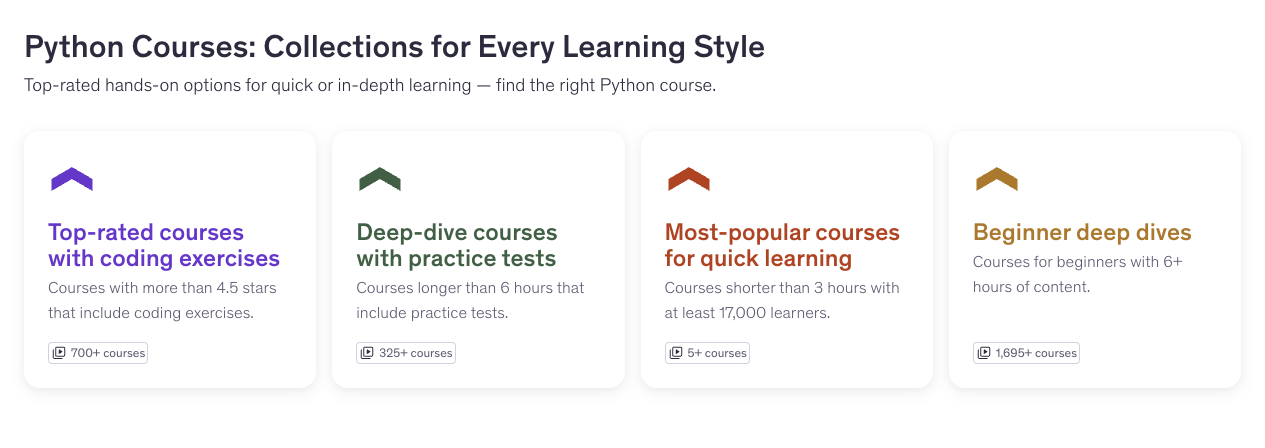
A follow-up story to fill the new FilterXFilter module on the 27 Topic Page Refresh test pages with a section title, description and four linked cards, so visitors can read and use them. The content was delivered as a JSON file.
- Topic pages
- Content modules
- Faceted search
- Structured content
User story
As a user, I'd like the FilterXFilter modules on the 27 pages in the Topic Page Refresh to be populated with copy and links so that I can read and interact with them.
Context
In a previous ticket, we built a new FilterXFilter module, which contains space for 4 hyperlinks, titles, and descriptions, along with the module title and description. This ticket seeks to populate those modules on the 27 test pages.
Acceptance criteria
The following sections of the FilterXFilter module are populated on the 27 test topic pages:
- Section title
- Section description
- Button 1
- Title
- Description
- Hyperlink
- Button 2
- Title
- Description
- Hyperlink
- Button 3
- Title
- Description
- Hyperlink
- Button 4
- Title
- Description
- Hyperlink
The content for each page was supplied in a separate file.
Data format
Requested as JSON, so the copy and links were converted to a .json file for the build.
Delivery
Summarized from Ben’s and the engineer’s comments on the ticket.
- The first .json file with the copy and links was shared with engineering for the build.
- The engineer integrated the module package into the site's front end, where it worked as expected; every card showed a placeholder "500+ courses" until the real course counts arrived.
- A revised .json file followed, with this note from Ben:
Thanks for your patience on this. A new .json file is ready. Unfortunately, I ended up updating some of the other fields when I started to notice some issues or opportunities to be more granular with the filters. The net result is an entirely new file instead of just the course counts. Let me know if you need any modifications or have any questions!
The engineer then updated the JSON with the proper course counts and some updated URLs and descriptions.
 (full-size image)