bengarves.com/work/configuration-cleanup
Configuration Cleanup
Project One Pager: OneTrust Config Cleanup
From Ben Garves’s work at Udemy. Re-created from the original document, with people’s names, internal links and non-public numbers removed or generalized.
Project brief
- Company
- Udemy
- Type
- Project one-pager
- Platform
- OneTrust cookie consent management
- Prioritization
- RICE
- Teams
- Data Privacy, Platform Product, Consumer Engineering, SEO/Marketing, Consumer Product
A plan to clean up Udemy’s OneTrust cookie-consent configuration, which defined rules for tens of thousands of individual URLs instead of domains and bloated one script into the majority of the JavaScript on pages tested, to improve Core Web Vitals site-wide.
- Core Web Vitals
- Site performance
- Technical SEO
- Cookie consent
RICE Score
Prioritized with the SEO team’s RICE framework (Reach × Impact × Confidence ÷ Effort).
| Work | Impact | Confidence | Effort |
|---|---|---|---|
| Config Update | 3 | 100% | 5 |
Background
Udemy currently loads OneTrust’s cookie consent management platform with a configuration that includes behavior definitions for tens of thousands of URLs, when instead it could apply those rules domain-wide.
This has resulted in larger page file sizes, as:
- The
otAutoBlock.jsfile is far larger than it should be, both compressed (should be <10KB) and uncompressed (should be <2MB) - The file makes up the majority of the JavaScript payload on pages we tested (the logged-out homepage, or LOHP, and a sample of course landing pages, or CLPs, and Topic pages)
- We estimate the large majority of the OneTrust vendor database is going unused
The Core Web Vitals and HAR file analysis behind these findings measured LCP, INP and OneTrust’s share of total JavaScript on the LOHP, a CLP sample and a Topic page sample.
Deep Dive
The OtAutoBlock.js file that’s created by our OneTrust configuration seems to be much larger than it needs to be because of how that config is set up. We can tell by its outsized weight compared to every other item loading for the page:
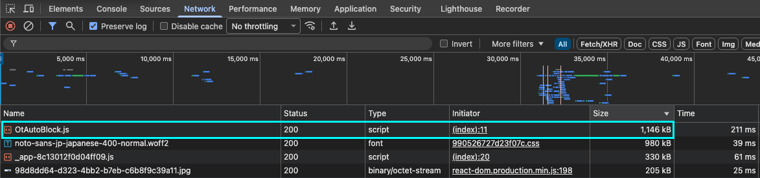 (full-size image)
From what we can see in the file, it’s configured to handle vendor definitions on a per-URL basis instead of using domain-level rules. Because of that, each page is loading with a file containing a list of tens of thousands of individual URLs:
- CLP URLs
- User URLs
- API endpoint URLs
One line of the OtAutoBlock.js file contains millions of characters and is the largest source of bloat in the file.
This appears to be happening instead of using domain-level rules, which would go from a format like this (with tens of thousands of individual URLs):
js
I = w('[
  {"Tag":"https://www.udemy.com/user/<username>/","CategoryId":["C0002","C0003"],"Vendor":null},
  {"Tag":"<api-endpoint-url>","CategoryId":["C0002"],"Vendor":null},
  {"Tag":"https://www.udemy.com/course/genesys-cloud-agent/","CategoryId":["C0002"],"Vendor":null},
  {"Tag":"https://www.udemy.com/user/<username>/","CategoryId":["C0002","C0003","C0004"],"Vendor":null},
]')
To a format like this, with 20–50 total domain patterns:
js
I = w('[
  {
    "Domain": "*.udemy.com",
    "CategoryId": ["C0002"],
    "Vendor": "Udemy Analytics",
    "Purpose": "Internal analytics and user behavior tracking"
  },
  {
    "Domain": "*.googletagmanager.com",
    "CategoryId": ["C0002"],
    "Vendor": "Google Tag Manager",
    "Purpose": "Tag management and analytics"
  },
  {
    "Domain": "*.doubleclick.net",
    "CategoryId": ["C0004"],
    "Vendor": "Google Ads",
    "Purpose": "Advertising and conversion tracking"
  },
  {
    "Domain": "*.amplitude.com",
    "CategoryId": ["C0002"],
    "Vendor": "Amplitude",
    "Purpose": "Product analytics"
  },
  {
    "Domain": "*.stripe.com",
    "CategoryId": ["C0001"],
    "Vendor": "Stripe",
    "Purpose": "Payment processing (strictly necessary)"
  }
]')
Who is the user?
| User | Notes |
|---|---|
| Google & Crawlers | Crawl budget consumed with excessive JavaScript; JS parsing impacts CWV |
| Prospective Users (Logged-Out Visitors) | First-time visitors and those with cleared cookies experience full OneTrust download |
| Users With Slow Connections | The oversized file disproportionately impacts 3G/4G connections in locales like India, Brazil, etc. |
Why is solving these problems big enough to matter?
Google’s Core Web Vitals and standards for ‘Good’ performance exist to provide benchmarks for organizations to create quality experiences that, when paired with quality in-demand content, will be rewarded with more search impressions. Because this bloated OneTrust file makes up the majority of the total JavaScript payload, any significant change in that file’s size will have measurable impact on LCP and INP scores on all pages across the Udemy ecosystem.
In addition to and/or resulting CWV impact, these changes are highly likely to:
- Improve search rankings
- Improve on-page conversion rates
- Improve user experience and brand perception
- Decrease infrastructure cost
What is the hypothesis?
Optimizing OneTrust to include only the vendors Udemy is using will result in a reduction of all page sizes, improved LCP and INP performance, and better conversion rates across the ecosystem.
What are the success criteria?
We estimate the OtAutoBlock.js file can:
- Be decreased to <2MB
- Have its transfer size decrease to <10KB
A leading indicator of success would be that the rolling 28-day PageSpeed Insights scores see these changes:
| Page(s) | INP | LCP |
|---|---|---|
| LOHP | Decrease | Decrease |
| CLPs | Decrease | Decrease |
| Topic Pages | Decrease | Decrease |
Within six months, we’d anticipate that this results in an increase in average page rank, resulting in a lift in organic search clicks.
What are we building?
In theory, this project hinges only on a configuration change in the OneTrust platform, but the change needs to be informed by validating the full list of vendors being used before making the change. For that reason, we’re breaking the work into three phases:
Phase 1 – Engineering Discovery
This phase leverages an engineer to validate the OneTrust file is truly bloated and for the reasons laid out in this PRD, that no ancillary work needs to happen beyond the changing of the OneTrust configuration, and that work to clean up the configuration will have the impact we’re estimating.
Phase 2 – Vendor Discovery
The biggest lift for this project will be the work to make sure no functionality/support is lost for tracking tools used across the Udemy ecosystem. The Vendor Discovery phase is intended to create a list of all vendors and tools that need to be supported by OneTrust and compile a list of what will be included in the configuration change.
Phase 3 – Implementation, Measurement and Monitoring
In this phase, we will:
- Make the configuration change in OneTrust
- Make any ancillary changes identified during Phase 1
- Measure the immediate impact to CWV using Lighthouse or another lab method
- Monitor CWV for the next 28 days
- Monitor page rankings for the next 6 months
What are the risks?
| Risk | Notes | Mitigation |
|---|---|---|
| Breaking active vendor integrations | Moving from support of all OneTrust default vendors to a list of only Udemy’s vendors could result in a used vendor being left out from the configuration. | The intent of the Phase 2 discovery work is to ensure any vendor we need to support remains supported in OneTrust. |
| Slowed Vendor Onboarding Process | Not supporting new vendors by default will add a step to the process of onboarding new vendors. | A workflow needs to be set up which would add new vendors to the OneTrust configuration when they’re brought on, along with removing un-utilized vendors through a periodic review process. |
Breaking active vendor integrations
- Notes
- Moving from support of all OneTrust default vendors to a list of only Udemy’s vendors could result in a used vendor being left out from the configuration.
- Mitigation
- The intent of the Phase 2 discovery work is to ensure any vendor we need to support remains supported in OneTrust.
Slowed Vendor Onboarding Process
- Notes
- Not supporting new vendors by default will add a step to the process of onboarding new vendors.
- Mitigation
- A workflow needs to be set up which would add new vendors to the OneTrust configuration when they’re brought on, along with removing un-utilized vendors through a periodic review process.
How will we go to market with this launch?
The configuration update for OneTrust will be a near-immediate global change.